RN2903 LIBRARY
Creating the RN2903 package and installing it
- First we download the rn2903-lora-library file into our system. You can download the rn290-lora-library from the ANRG github repository. The link to the repository is github repo for rn2903-lora-library .
- Then go ahead and create rn2903 folder inside rn2903-lora-library folder.
- Transfer all the files in rn2903-lora-library(except setup.py) folder to rn2903 folder.
- Open the command prompt.
- Go to rn2903-lora-library folder using the cd command.
- Run python setup.py build command. (Here Python 3 is used)
- Then go ahead and run python setup.py install command.
- The above two commands buids the rn2903 package and installs it in your system.
The figure below illustrates this process.
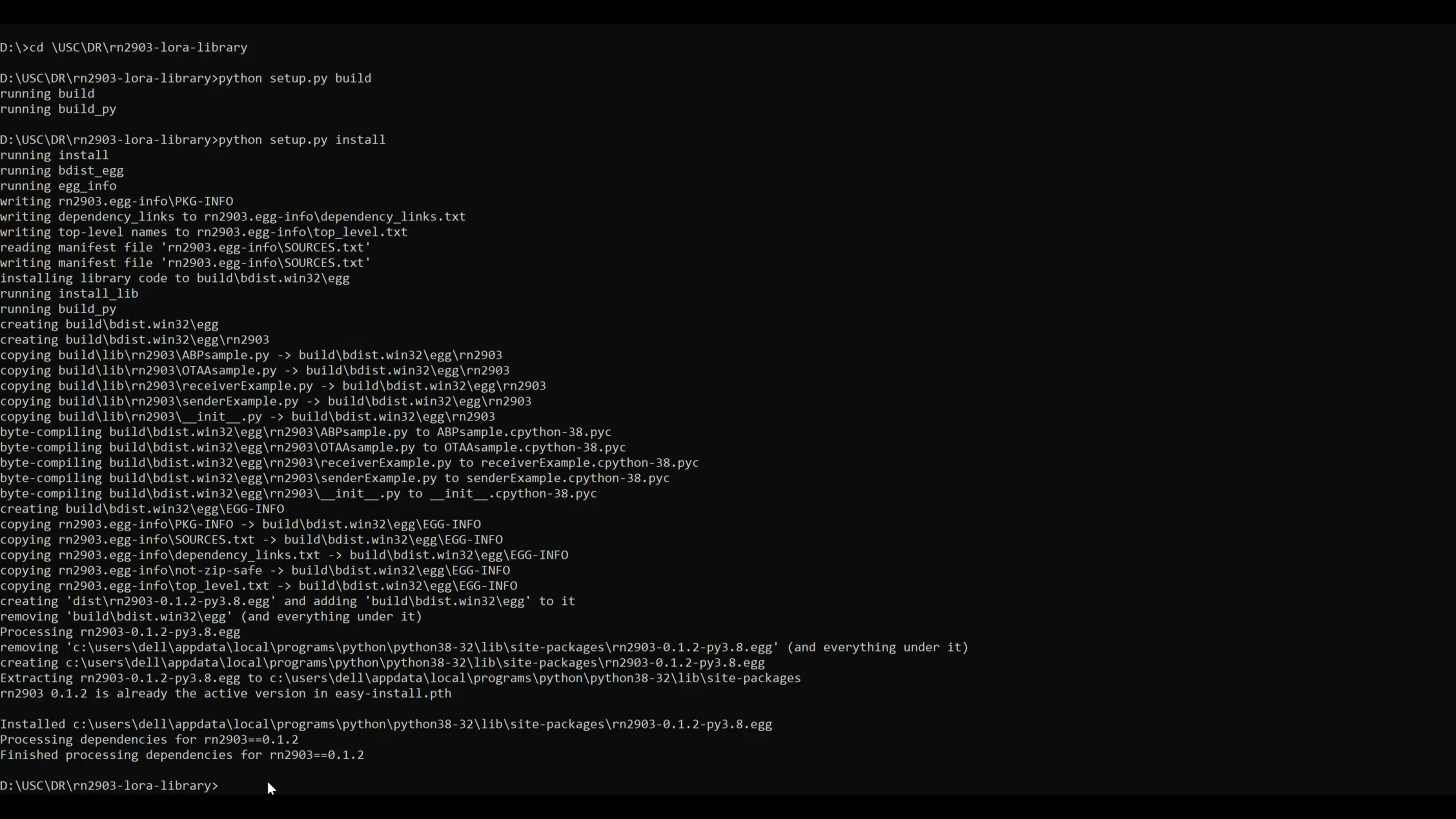
Creating the RN2903 package and installing it
Testing different helper functions in RN2903 package
- list_serial_ports
- Description: Prints the names of the serial ports for user to connect to
- Input Arguments: None
- Return Arguments: List of all serial ports connected
- Usage: print(list_serial_ports())
- open
- Description: Starts connection to the device at the serial port listed
- Input Arguments: Serial port name(as a string)
- Return Arguments: Rn2903 Object(used for communicating later). You can name it anything you like
- Usage: connection1 = open(‘COM3’)
- status
- Description: Checks if the device is connected returns result
- Input Arguments: RN2903 Name
- Return Arguments: None
- Usage: print(status(connection1))
- startRX
- Description: Sends all of the commands nessecary to set up the reciever with default values (radio pwr=14, watch dog timer=1 min).
- Input Arguments: RN2903 Name
- Return Arguments: True for success, false for failure
- Usage: startRX(connection1)
- receive
- Description: Recieves a message and returns it as a string
- Input Arguments: RN2903 Name
- Return Arguments: Message received from sender(string) or error timeout
- Usage: print(receive(connection1))
- startTX
- Description: Sends all of the commands necessary to set up the sender with default values
- Input Arguments: RN2903 Name
- Return Arguments: True for success, false for failure
- Usage: startRX(connection1)
- send
- Description: Sends a string to the reciever with a maximum of 44 characters
- Input Arguments: RN2903 Name, text(as a string)
- Return Arguments: True for success, false for failure
- Usage: receive(connection1, text to send as a string)
- setFreq
- Description: Sets the frequency
- Input Arguments: RN2903 decimal representing the frequency, from 902000000 to 928000000 in Hz
- Return Arguments: True for success, false for failure
- Usage: setFreq(connection1, 902000000)
- setPower
- Description: Sets the power for radio
- Input Arguments: RN2903 Name, signed decimal number representing the transceiver output power, from 2 to 20
- Return Arguments: True for success, false for failure
- Usage: setPwr(connection1, 14)
- setWDT
- Description: Sets the watchdog timer for reciever
- Input Arguments: RN2903 Name, decimal number representing the time-out length for the Watchdog Timer, from 0 to 4294967295 in ms. Set to ‘0’ to disable this functionality
- Return Arguments: True for success, false for failure
- Usage: setWDT(connection1, 100000)
- setSpr
- Description: Spreading Factor
- Input Arguments: RN2903 Name, string representing the spreading factor. Parameter values can be: sf7, sf8, sf9, sf10, sf11 or sf12
- Return Arguments: True for success, false for failure
- Usage: setSpr(connection1, sf10)
- setBW
- Description: Set Bandwidth
- Input Arguments: RN2903 Name, decimal representing the operating radio bandwidth in kHz. Parameter values can be: 125, 250, 500
- Return Arguments: True for success, false for failure
- Usage: setBW(connection1, 250)
- raw_command
- Description: Type the exact commands from the reference manual. It will send the device the command and return the result
- Input Arguments: RN2903 Name, command(as a string)
- Return Arguments: String from rn2903 module
- Usage: raw_command(connection1, “sys get ver”)
MAC Commands
- joinABP
- Description: Connects the device to the gateway using ABP
- Input Arguments: Serial port name(as a string), device address, network session key application key
- Return Arguments: True for success, or error message
- Usage: joinABP(con,devAddr,nwkSKey,appSKey)
- joinOTAA
- Description: Connects the device to the gateway using OTAA
- Input Arguments: Serial port name(as a string), appeui, appKey
- Return Arguments: True for success, or error message
- Usage: joinOTAA(con2, appEui, appKey)
- Variables to Define
- OTAA:
- appEui
- appKey
- ABP:
- devAddr
- nwkSKey
- appSKey
- OTAA:
The below image shows the execution of the above said helper functions and their outputs:

Output of helper functions in rn2903 library
In the next section, we are going to set up the Things Network.